ATK Identifying Properties
In Linux applications, CukeTest identifies and locates UI elements through a series of identifying properties. These properties help automation tools accurately recognize controls, enabling automated testing tasks.
For more information about model objects and their properties, please refer to the Model Objects and Properties documentation.
Common Identifying Properties
The following are commonly used identifying properties in Linux applications. While these properties also exist in other automation technologies (such as Windows automation), they may have different meanings in Linux applications.
type
- Describes the type of the control, a required property that cannot be changed or deleted.
- The control type determines the operation APIs available for the control.
- Common types include Button, Label, Window, List, Table, Tree, etc.
name
- Corresponds to the accessible name of the ATK control.
- The internal object name of the control.
text
- The text content displayed by the control.
- If the control has
text,label,title, or similar properties set during development, these properties are usually consistent with what users see, so they are prioritized for identification. - If the control does not have these properties set, this property is considered non-existent.
className
- The class name of the control, derived from the control's class definition in code.
classNamereflects the specific component used during development, helping to understand the application's structure.- For example, for a button control,
typemight be Button, whileclassNamemight beToggleButton, as shown below: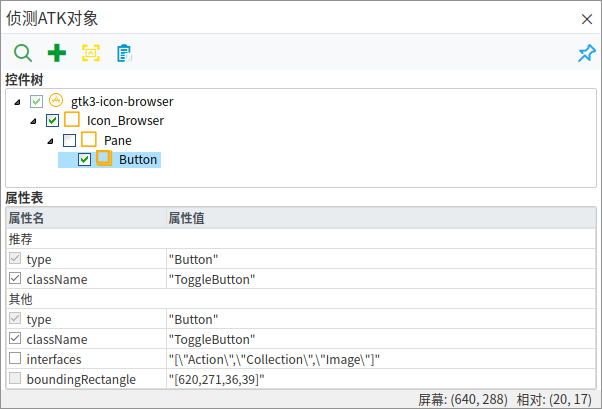
Auxiliary Identifying Properties
index
- Describes the position of the target control among multiple matched controls.
- When identifying properties are insufficient to uniquely identify a control,
indexcan serve as an auxiliary solution. - For details, refer to Windows Identifying Properties.
objectType
- Describes the abstract type of the target control.
objectTypeis designed for more precise control and operation of controls.- For details, refer to Windows Identifying Properties.
Specific Identifying Properties
Specific identifying properties are those that appear only in certain types of controls. These properties help us more accurately locate and operate these specific controls.
itemPath
The position of the target control within the entire view component, existing in ListItem, TableItem, TreeItem, and ViewItem. However, the definition of the path differs slightly for different types of item. The type file definitions are as follows:
export type ItemPath = number; // Common in ListItem, uses a number to represent list item position.
export type ItemPath = number[]; // Common in TreeItem, uses a number array to represent tree node path
export type ItemPath = string[]; // Common in TreeItem, uses a string array to represent tree node name path, automatically finds matching tree nodes
export type ItemPath = [number, number]; // Common in TableItem, an array of length 2, where the two numbers represent row and column, indicating cell position.
export type ItemPath = (number | string | [number, number])[]; // Common in TreeItem, uses a more complex array to represent a column property of a tree node, with the last value in the array being a row-column array. If ItemPath is written as [0, [0, 0]], it represents the first column property of the first child node of the first node in the tree.ItemPath: int # Common in ListItem, uses a number to represent list item position.
ItemPath: List[int] # Common in TreeItem, uses a number array to represent tree node path
ItemPath: List[str] # Common in TreeItem, uses a string array to represent tree node name path, automatically finds matching tree nodes
ItemPath: [int, int] # Common in TableItem, an array of length 2.
# The two numbers in the array represent row and column, indicating cell position through row and column.
ItemPath: List[Union(str, int, ItemPath)] # Common in TreeItem, uses a more complex array to represent a column property of a tree node, with the last value in the array being a row-column array.
# If ItemPath is written as [0, [0, 0]], it represents the first column property of the first child node of the first node.ItemPath can be considered a universal format for describing the position of items in data views, with different shorthand forms in different types of views. Since a table (Table) can be analogized to a single-level tree (Tree), and a list (List) can be analogized to a single-column table (Table), all ItemPaths can actually be written in the same form (though more complex and less readable).
- List:
[1]can be written as[[1,0]]. - Table:
[1, 1]can be written as[[1, 1]]. - Tree:
[1, 1]can be written as[1, [1, 0]].
As you can see, the ItemPath for any data view can be written in the same, complete two-dimensional array format.